



On Thursday 12 November 2026, thousands of businesses around the world were unable to open their Outlook email or manage their Teams meetings for more than 15 hours. It was a global outage of Microsoft 365 that started in Exchange Online, the service that hosts the mailboxes, and then spread to other services. Here is what happened during the Outlook and Teams outage, whether email was lost and what your business can do when Microsoft 365 is down.
What happened to Microsoft 365
The incident started on Thursday at around 17:15 Spanish time. First it hit mailboxes in the Americas and then, overnight, it spread to Europe, Asia and Oceania. At its peak, Downdetector logged about 140,000 Outlook reports in 74 countries.
According to Microsoft, several Exchange Online servers went down unexpectedly. Their traffic moved to the remaining servers, which became overloaded and failed one after another. In addition, the system that checks server health stopped recovered servers from returning to normal. Microsoft said there was no sign of a cyberattack and promised a report with the root cause.
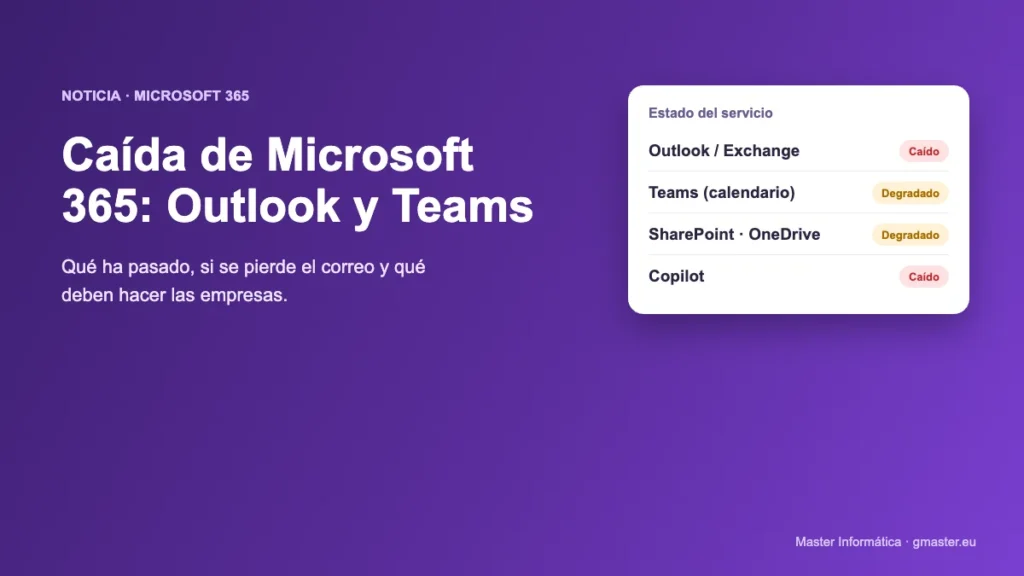
Which services were affected
- Outlook and Exchange Online: many users could not open their mailbox, and email was delayed.
- Teams: chat and meetings mostly worked, but the calendar and meeting scheduling failed.
- SharePoint, OneDrive, Planner and To Do: were unstable for some organisations.
- Copilot: could not reach email, calendar or work files.
- Admin and security tools: the admin centre, Defender and Purview loaded slowly or not at all.
Is email lost when Outlook is down?
No. Emails sent to you during an outage are not lost. Sending servers keep retrying for hours and, during this outage, Microsoft extended the delivery window for delayed mail to 48 hours. Once your mailbox is back, messages arrive gradually.
Therefore, there is no need to ask your clients to send anything again. If a message is urgent, simply confirm it by phone.
What to do if Outlook or Teams stops working in your business
- Do not change anything on your computers. The fault is on Microsoft's servers. Do not delete your Outlook account, reinstall Office or change your password: it will not help, and it can slow down your recovery.
- Do not resend emails. They will be delivered once the service recovers. If you resend them, your contacts will get duplicates.
- Use other channels for urgent matters. Phone, WhatsApp or an email account with another provider for key clients and suppliers.
- Move important meetings. If a Teams meeting cannot wait, hold it on Google Meet, Zoom or by phone.
- Check the official status. Microsoft posts updates on status.cloud.microsoft and on the Microsoft 365 Status account on X.
- Be wary of "support" messages. Fake emails and calls offering to "fix Outlook" are common at times like this. Microsoft will never ask for your password or ask you to install anything.
If you manage Microsoft 365: keep records for a claim
Microsoft commits to 99.9% monthly uptime for Exchange Online, Teams and SharePoint. If it misses that target, you can request a service credit. It is not applied automatically: your administrator has to request it from the Microsoft 365 admin centre.
To do that, write down:
- The incident IDs shown in your admin centre (for example, EX1550543 and MO1550821).
- When the problem started and ended for your business.
- How many users were affected, and in which offices.
- What you did to try to fix it.
If you bought your licences through a partner, the claim goes through them.
What this outage teaches small businesses
No cloud service is perfect, not even Microsoft's. What matters is that an outage like this does not stop your business. That is why a small contingency plan is worth having:
- A list of key contacts (clients, suppliers and staff) with phone numbers, stored outside Outlook.
- An agreed backup channel for your team.
- Backups of your Microsoft 365 email and files, independent of Microsoft.
- Someone you trust who watches the service status and keeps the team informed.
At Master Informática we help businesses in Benalmádena, Marbella and the Costa del Sol prepare this plan and manage their business email and their backups as part of our IT maintenance for businesses.
Frequently asked questions
Was the Microsoft outage a cyberattack?
According to Microsoft, no. The company said there was no sign of malicious activity and that the cause was a capacity failure in its Exchange Online servers.
How long did the Outlook and Teams outage last?
More than 15 hours. It started on the afternoon of Thursday 12 November, and Microsoft restored the service in stages from the morning of Friday 13 November.
Do I need to do anything on my computer when Microsoft 365 is down?
No. If the fault is on Microsoft's servers, Outlook and Teams work again on their own once it is fixed, with no action on your side.
Can I claim compensation from Microsoft?
Yes. If monthly uptime falls below 99.9%, your administrator can request a service credit from the Microsoft 365 admin centre, with the incident details.
Need help?
If your business uses Microsoft 365 and you want to be ready for the next outage, call us on 629 555 302 or email info@gmaster.eu. We will help you review your email, backups and contingency plan.
IT maintenance