



On 13 October 2026 the first year of Extended Security Updates for Windows 10ended. If your office still has computers running Windows 10, and many businesses on the Costa del Sol do, it is time to decide: pay for another year of patches, move to Windows 11 or replace the computer. We explain what has changed, what each option costs and how to decide what suits you, computer by computer.
What has happened with Windows 10
Microsoft ended official support for Windows 10 on 14 October 2025. Since then, the only way to keep receiving security patches is the Extended Security Updates (ESU)programme, which is purchased by the year. That first year has just ended, and it is no small issue: according to HP, in mid-2026 around 30% of computers in use were still running Windows 10.
A Windows 10 computer without ESU still switches on and works the same. The problem is that every new security flaw discovered stays open forever. And a single vulnerable computer is enough for ransomware to get into the whole office network.
Businesses and individuals do not have the same rules
This is the confusion we see every week. In June 2026 Microsoft extended free updates for individuals until 12 October 2027 , and many people took that to mean Windows 10 "has another year" for everyone. That is not the case:
- ESU for individuals (until October 2027): it is for personal computers. In Spain, as in the rest of the European Economic Area, it is free when signed in with a Microsoft account. Computers joined to a company domain or centrally managed are excluded.
- ESU for businesses (paid): year 1 cost about $61 per device; year 2, until 12 October 2027, costs about $122, and year 3, until October 2028, about $244. The price is cumulative: if you sign up now, you also pay for the year you skipped.
A freelancer with their own laptop may be covered by the ESU for individuals. An office with managed computers, a server or a domain usually is not. If you do not know which group your computers fall into, that is the first thing we check.
Your three options, computer by computer
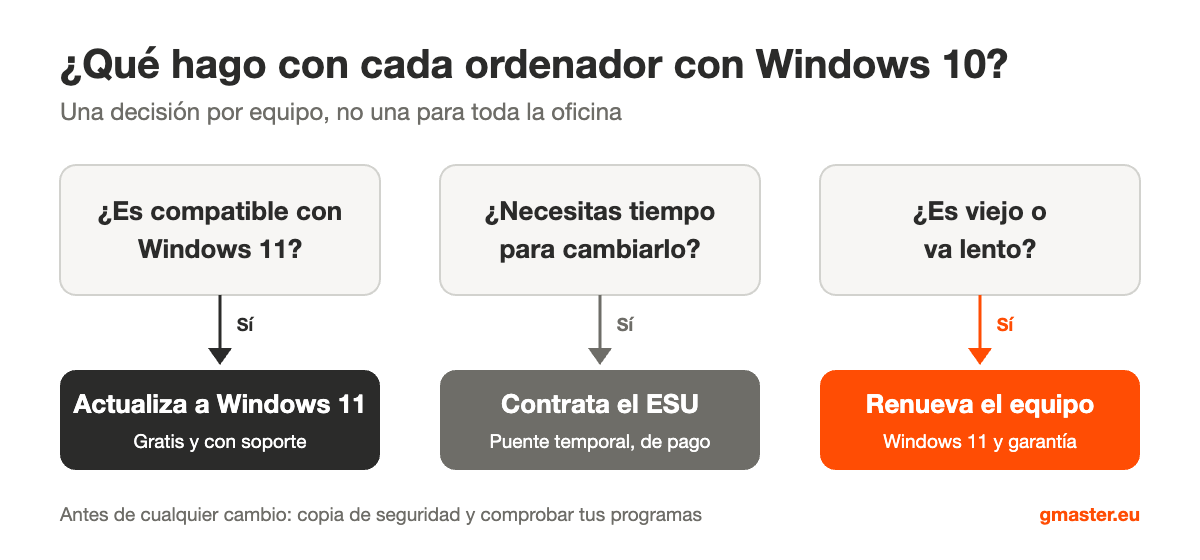
1. Move to Windows 11 (if the computer is compatible)
This is the best option when the computer supports it: the upgrade is free and the computer is supported again for years. Windows 11 requires a relatively recent processor and a TPM 2.0security chip, so many computers from 2018 onwards can make the jump. First, check that your management software, printers and scanners work with Windows 11.
2. Buy ESU (if you need time)
It makes sense for computers that cannot be changed yet: an old program that only runs on Windows 10, a machine connected to another device or a computer you will replace in a few months. It is a bridge, not a solution: it gets more expensive every year and only brings security patches, nothing new.
3. Replace the computer
If the computer is not compatible with Windows 11 and is already slow, paying for ESU is usually money down the drain. A new computer comes with Windows 11, a warranty and years of support ahead. We explain it in more detail in when to repair or replace a computer.
How to know the situation of each computer
- Check the Windows version: in Settings > System > About. If it says Windows 10, read on.
- Check whether it is compatible with Windows 11: Microsoft's free PC Health Check app tells you in a minute.
- Check whether it has ESU: Settings > Update & Security > Windows Update shows whether the computer is enrolled.
- Note which programs it uses: accounting, invoicing, design, digital certificates… These are the ones that may cause problems when changing systems.
- Make a backup before touching anything. We explain how in our guide to backups for SMEs.
Watch out for servers too: Windows Server 2016 ends in January
If your business has a server running Windows Server 2016, its support ends on 12 January 2027, in just over two months. An unpatched server is even more dangerous than a laptop, because it holds the whole company's data. It is a good time to plan the migration or consider moving some of those services to the cloud.
And if you are thinking about Verifactu, do both at once
Many businesses will have to update their invoicing software in the coming months because of Verifactu and e-invoicing. Those new programs will require up-to-date computers, so it makes sense to plan both together. We explain it in the new Verifactu timeline.
Frequently asked questions
Can I keep using Windows 10 in my business?
You can, but without ESU the computer receives no security patches and becomes more and more vulnerable. For a computer with client data or access to online banking, we do not recommend it.
Does the free ESU until 2027 work for my office?
Only for personal computers that are not managed or joined to a company domain. Corporate computers need the paid ESU for businesses.
Will I lose my files when moving to Windows 11?
Usually not: the upgrade keeps files and programs. Even so, we always make a backup first, because that is when an old drive may fail.
We help you leave Windows 10 behind without stopping the office
At Master Informática we review your company's computers one by one and tell you which can move to Windows 11, which should be replaced and which need ESU temporarily. We carry out the migration outside working hours if needed, with a prior backup and checking that your programs still work. It is part of our IT maintenance for businesses in Benalmádena, Marbella and the Costa del Sol, and the first review is free.
📞 629 555 302 · 💬 WhatsApp · ✉️ Contact form
Information updated in November 2026. ESU prices for businesses are set by Microsoft in dollars per device and may vary depending on where you buy.
IT maintenance